> ## Documentation Index
> Fetch the complete documentation index at: https://docs.valaclaims.com/llms.txt
> Use this file to discover all available pages before exploring further.
# Claims
> Organize claim work across Clients and open the record that needs attention.
## Overview
Use **Claims** to review and organize claim work across your organization. The workspace lists the same Claim records that appear in a Client record's **Claims** tab. Use the global workspace to work across Clients, and the Client record when you need the surrounding client context.
 ## Use views to focus your work
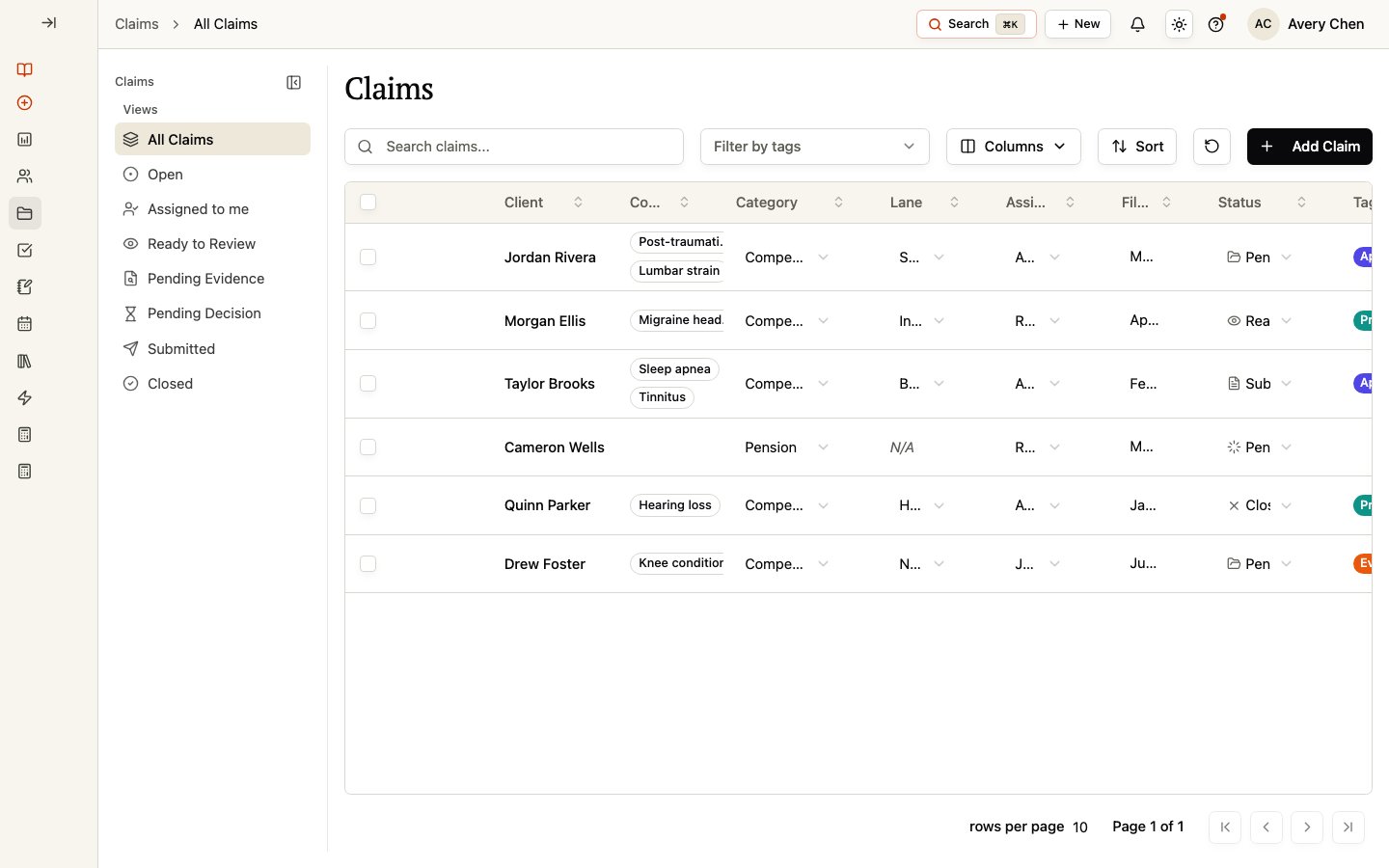
The left-side views are **All Claims**, **Open**, **Assigned to me**, **Ready to Review**, **Pending Evidence**, **Pending Decision**, **Submitted**, and **Closed**. Select a view to focus the table on that stage of work.
Search by claim or Client information, filter by tags, and use **Sort** to change the order. Select **Columns** to show or hide standard and configured custom-field columns, then reset the table layout when you want to return to its saved starting arrangement.
The table can include Client, Conditions, Category, Claim Number, Docket Number, Lane, Days Open, Current Lane Age, Assigned to, Filing Date, Decision Date, Appeal Deadline, Status, Tags, Comments, Tasks, and configured Claim custom fields. Your organization can expose a different set of columns.
Some table fields can be edited directly when you have access, including Category, Claim Number, Docket Number, Lane, Assigned to, dates, and Status. Open the Claim record for the full workspace.
When you select one Claim, you can use **Quick view**, **Open record**, or **Edit**. Selecting one or more Claims also makes **Delete** available. Confirm that the selected records are the intended ones before using a selection action.
## Understand Status and Review lane
**Status** describes the current work state for a Claim. Current values include **Ready to Review**, **Pending Evidence**, **Pending Decision**, **Submitted**, and **Closed**.
**Review lane** is a separate classification used for Compensation claims. The available lanes are **New**, **Supplemental**, **Increase**, **Higher Level Review**, **CUE (Clear & Unmistakable Error)**, **CAVC**, **TDIU**, **SMC (Special Monthly Compensation)**, and **Board Appeal**. A Review lane does not replace Status. For non-Compensation categories, the same Compensation lane choices do not apply in the same way.
## Create a Claim
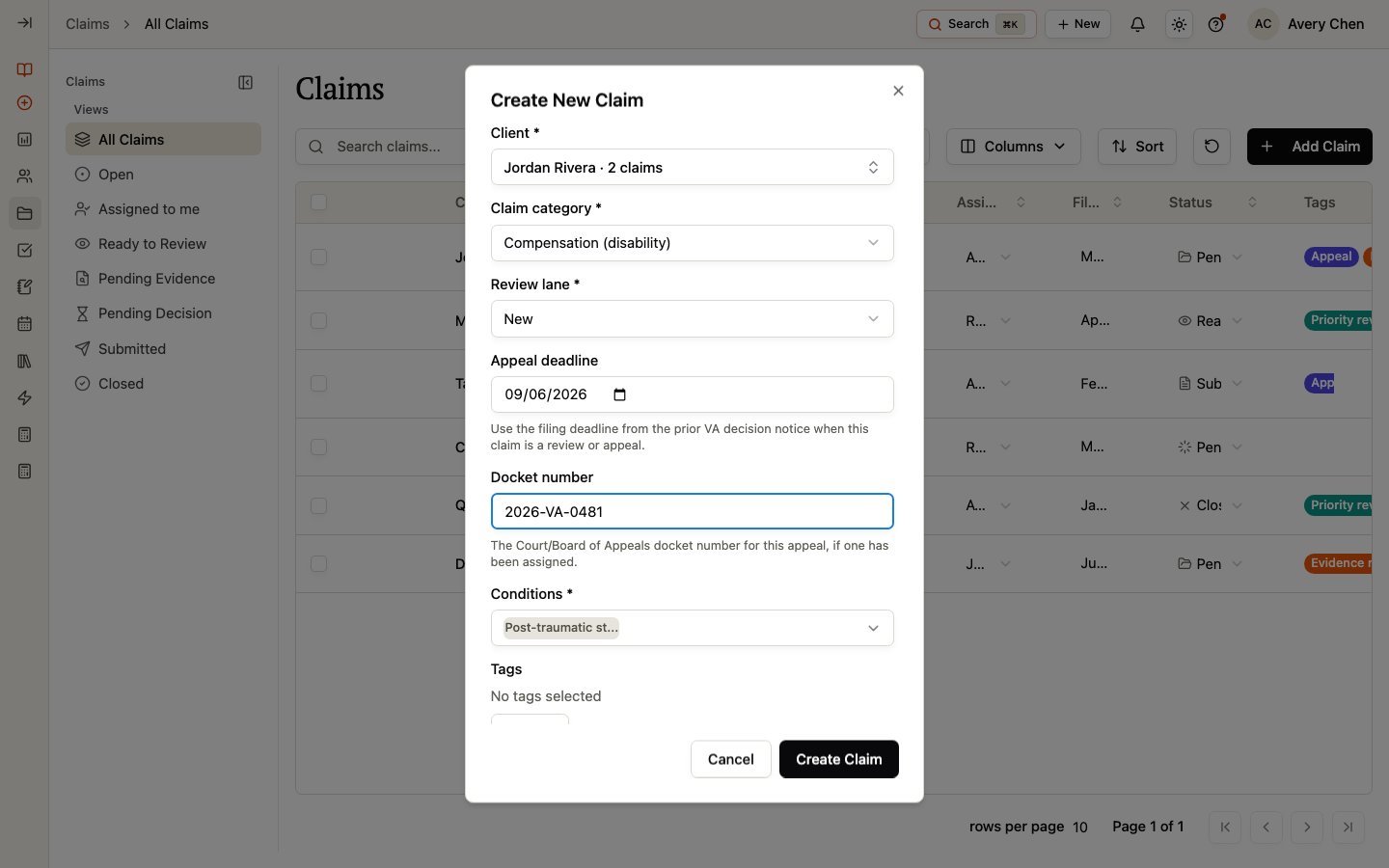
Select **Add Claim** from the global workspace, or open a Client record and use its **Claims** tab to start with that Client already selected.
A Client is required. Select an existing Client, or start **Add Client** when it is available and you need to create the Client first.
A Claim category is required. Current categories are **Compensation (disability)**, **Pension**, **Dependency & survivor benefits**, **Education benefits**, **Housing / loan benefits**, **Healthcare**, **Burial / memorial**, **Insurance**, and **Administrative / other**.
For Compensation, choose a Review lane and link at least one Condition. For a Board Appeal, select the applicable subtype.
Add an appeal deadline, docket number, tags, or workspace custom fields when they apply, then select **Create Claim**.
## Use views to focus your work
The left-side views are **All Claims**, **Open**, **Assigned to me**, **Ready to Review**, **Pending Evidence**, **Pending Decision**, **Submitted**, and **Closed**. Select a view to focus the table on that stage of work.
Search by claim or Client information, filter by tags, and use **Sort** to change the order. Select **Columns** to show or hide standard and configured custom-field columns, then reset the table layout when you want to return to its saved starting arrangement.
The table can include Client, Conditions, Category, Claim Number, Docket Number, Lane, Days Open, Current Lane Age, Assigned to, Filing Date, Decision Date, Appeal Deadline, Status, Tags, Comments, Tasks, and configured Claim custom fields. Your organization can expose a different set of columns.
Some table fields can be edited directly when you have access, including Category, Claim Number, Docket Number, Lane, Assigned to, dates, and Status. Open the Claim record for the full workspace.
When you select one Claim, you can use **Quick view**, **Open record**, or **Edit**. Selecting one or more Claims also makes **Delete** available. Confirm that the selected records are the intended ones before using a selection action.
## Understand Status and Review lane
**Status** describes the current work state for a Claim. Current values include **Ready to Review**, **Pending Evidence**, **Pending Decision**, **Submitted**, and **Closed**.
**Review lane** is a separate classification used for Compensation claims. The available lanes are **New**, **Supplemental**, **Increase**, **Higher Level Review**, **CUE (Clear & Unmistakable Error)**, **CAVC**, **TDIU**, **SMC (Special Monthly Compensation)**, and **Board Appeal**. A Review lane does not replace Status. For non-Compensation categories, the same Compensation lane choices do not apply in the same way.
## Create a Claim
Select **Add Claim** from the global workspace, or open a Client record and use its **Claims** tab to start with that Client already selected.
A Client is required. Select an existing Client, or start **Add Client** when it is available and you need to create the Client first.
A Claim category is required. Current categories are **Compensation (disability)**, **Pension**, **Dependency & survivor benefits**, **Education benefits**, **Housing / loan benefits**, **Healthcare**, **Burial / memorial**, **Insurance**, and **Administrative / other**.
For Compensation, choose a Review lane and link at least one Condition. For a Board Appeal, select the applicable subtype.
Add an appeal deadline, docket number, tags, or workspace custom fields when they apply, then select **Create Claim**.
 ## Quick view or open the full record
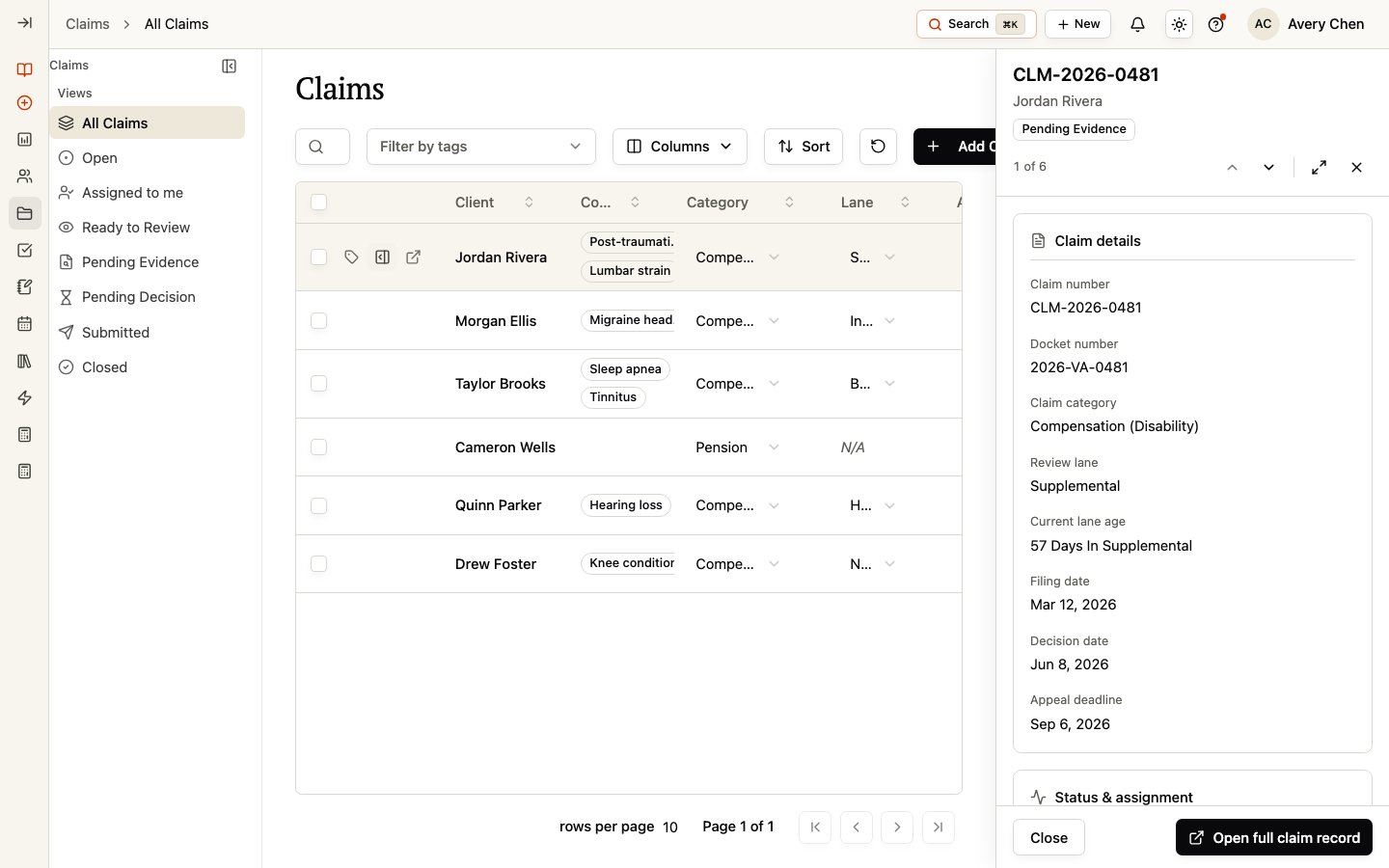
Select a Claim to open **Quick view** for a compact summary of its details, status, assignment, and dates. Choose **Open full claim record** when you need to prepare or review the work in depth.
## Quick view or open the full record
Select a Claim to open **Quick view** for a compact summary of its details, status, assignment, and dates. Choose **Open full claim record** when you need to prepare or review the work in depth.
 ## Work from a Client record
The **Claims** tab in a Client record only shows that Client's claims. It does not create a second copy of the Claim. Changes you make there are reflected in the global Claims workspace and vice versa.
## Claim record guidance
Prepare a Claim with Conditions, evidence, forms, tasks, comments, and review guidance.
Maintain filing, decision, appeal, ITF, and docket information.
Review changes to a Claim and filter the history by field group.
Review permission-controlled financial records and document findings.
## Related pages
Manage the Client Conditions that can be linked to a Claim.
Manage Client documents before linking supporting evidence to a Claim.
Prepare and send forms using your organization's signing workflow.
Manage Client work that can be linked to a Claim.
## Work from a Client record
The **Claims** tab in a Client record only shows that Client's claims. It does not create a second copy of the Claim. Changes you make there are reflected in the global Claims workspace and vice versa.
## Claim record guidance
Prepare a Claim with Conditions, evidence, forms, tasks, comments, and review guidance.
Maintain filing, decision, appeal, ITF, and docket information.
Review changes to a Claim and filter the history by field group.
Review permission-controlled financial records and document findings.
## Related pages
Manage the Client Conditions that can be linked to a Claim.
Manage Client documents before linking supporting evidence to a Claim.
Prepare and send forms using your organization's signing workflow.
Manage Client work that can be linked to a Claim.